Reading time: ~9 minutes
When an AdGuard alert lands in Wazuh, you know which domain was blocked — but not whether it is phishing, malware, or just noisy advertising.
What you’ll achieve
- Automatically enrich AdGuard alerts with urlscan.io
- Receive Telegram notifications only for high-confidence threats
- Avoid submitting private URLs to external services
- Run everything on Wazuh-lite without relying on the official Dashboard
This post walks through integrating urlscan.io with Wazuh-lite so interesting alerts pick up URL reputation without leaving Grafana or your existing Telegram workflow. AdGuard blocks the request, while urlscan.io provides the additional context needed to quickly determine whether the alert deserves investigation.
This implementation was inspired by Moiz Ud Din Rafay’s excellent Medium article (Urlscan.io Integration with Wazuh SIEM for Automated URL Reputation Enrichment, July 2026).
We adapted it to our stack:
- Wazuh 4.14.5
- Docker (manager on raam)
- Grafana +
alerts.json(no classic Indexer Dashboard) custom-telegram.py
Useful references: urlscan.io docs, the urlscan API, and the Wazuh Integrator. It fits the same lab story as parental control with Wazuh and AdGuard and the Grafana dashboard without Elasticsearch.
Before vs. After
Before (AdGuard → Wazuh only):
AdGuard blocks evil-domain.com
         ↓
Wazuh alert level ≥7
         ↓
Telegram: “domain blocked” + endpoint
You know which endpoint triggered the alert and which domain was blocked. You do not know what it is.
After (+ urlscan enrichment):
AdGuard blocks evil-domain.com
         ↓
Wazuh alert level ≥7 ──→ parental Telegram (as usual)
         ↓
custom-urlscan → urlscan.io (search / result)
         ↓
alerts.json → Grafana
         ↓
If malicious/suspicious + API key → Telegram URLSCAN REPUTATION
  · Title: Microsoft Login
  · Verdict: Malicious
  · IP: 104.x.x.x
  · Link to the scan
The operator decides in seconds whether the alert deserves attention or is noise.
Why urlscan instead of VirusTotal?
A question that comes up often: why urlscan and not VirusTotal? We chose urlscan because:
- You can search existing scans (
/search) without publishing your URL. - There is no need to submit private home-network domains (privacy).
- You get useful metadata: page title, IP, result link, and — with an API key — the reputation verdict.
- The free API is enough for a SOC-lite footprint.
- It works well as lightweight threat intelligence / IOC enrichment on alerts you already care about.
VirusTotal remains a solid alternative (more engines, larger ecosystem). Our bottleneck was not “is this in VT?”, but “what does this URL that AdGuard just cut actually look like?” — without leaving the SIEM and without pushing internal URLs into a submit portal.
For a homelab, urlscan strikes a strong balance between privacy, simplicity, and security context.
Lessons learned during implementation
This is what separates a lab write-up from polished vendor docs. What actually broke:
- Host
logs/directory not writable → create log/state files viadocker exec. /result/API → 403 without login → without a key there is noverdict_malicious; metadata + link + rule 126109 still work.- Regex false positives (ISO timestamps like
57.000Zparsed as a “domain”) → alphabetic TLD checks + preferdata.domain. - Custom integrations do not live on the volume → after a recreate, re-run
install-urlscan-integration.sh(docker cpinto/var/ossec/integrations). - Missing
custom-prefix →integratordrejects the script; side fix:k8s-audit-telegram.py→custom-k8s-audit-telegram.py. - urlscan Telegram without originating host / endpoint → enricher did not copy
client_*; fixed in enricher + formatter.
Architecture: asynchronous enrichment
AdGuard / parental / web / AUR
              │
              ▼
         Wazuh-lite
         (level ≥ 7)
         ┌────┴────┐
         ▼         ▼
   Telegram     custom-urlscan
   (baseline)        │
   (endpoint)        ▼
                urlscan.io
              search (+ /result)
                     │
                     ▼
              enrichment.log
                     │
                     ▼
         custom detection rules 12610x
                     │
              ┌──────┴──────┐
              ▼             ▼
         alerts.json    Telegram urlscan
         + Grafana      (malicious /
                         suspicious + key only)
Design decisions
- We only use
/searchand/result— never submit private URLs. - Integration scoped to specific groups + level ≥ 7 (not every DNS query).
- 24-hour cache so we do not hammer the reputation API.
- Own rule IDs 126100–126109 (avoid collisions with AdGuard 111xxx / AUR 125xxx; not the Medium article’s 111100 range).
- Wazuh’s embedded Python:
/var/ossec/framework/python/bin/python3.
Telegram notifications
| Event | Rule ID | Level | Telegram? |
|---|---|---|---|
| AdGuard / parental control | 1110xx / 1100xx | ≥7 | Yes — originating host, domain, category |
| Generic urlscan / cache / not_found | 126100, 104, 106–108 | 3 | No |
| urlscan without verdict (no API key) | 126109 | 3 | No |
| urlscan API failure | 126105 | 5 | No |
| urlscan malicious / suspicious / critical | 126101 / 102 / 103 | 14 / 12 / 14 | Yes* |
*Only when /result/ returns a real verdict. Without an API key, 126101/102/103 are not generated from the API.
In short:
- Telegram when AdGuard/parental fires (level ≥ 7), with the endpoint.
- Telegram when urlscan confirms malicious/suspicious (and you have an API key).
- No notification just because the API key is missing or enrichment could not produce a verdict.
The enricher copies client_name, client_ip, and domain from the source alert. Verified message format (rule 126101):
🦠 *URLSCAN REPUTATION*

👤 *Host:* Marcelo
📋 *Alert:* urlscan.io malicious URL reputation detected
💻 *Endpoint/IP:* `10.5.5.124`
🌐 *Domain:* `evil.example`
🔗 *URL:* https://evil.example/phish
🧾 *urlscan:* https://urlscan.io/result/abc/
🦠 *Verdict:* MALICIOUS
📊 *Risk:* critical
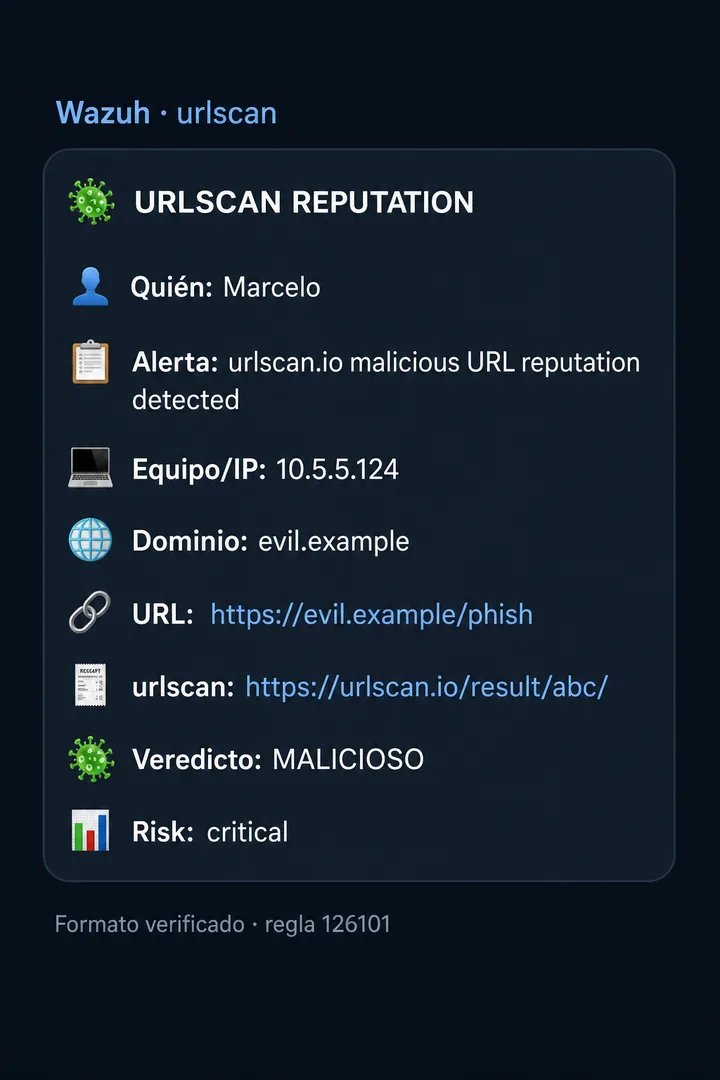
The live screenshots still show the Spanish labels because the bot is currently deployed in Spanish.
API key: metadata without it, reputation verdict with it
Important. Without an API key, enrichment still works (title, IP, scan link), but you do not get a reputation verdict (
malicious/suspicious). Rule126109is level 3, so it does not spam Telegram. If “I never get a verdict,” checketc/urlscan_api_keyfirst — do not assume the integration is broken.
Without etc/urlscan_api_key |
With API key |
|---|---|
| Public search OK | Search + /result/ |
| Title, IP, scan link | + verdict / score |
urlscan_verdict_unavailable (level 3) |
Possible Telegram 126101/102/103 |
| No urlscan reputation Telegram | Telegram on malicious/suspicious |
Store the key in etc/urlscan_api_key (gitignored). Free account: urlscan.io → Settings → API. When this post was written the key was not yet in production, so the reputation Telegram path was still pending that last piece.
Adaptations vs. the Medium article
| Reference article | Our wazuh-lite |
|---|---|
| Broad level-based integration | Specific groups + level ≥ 7 |
| IDs in the 111100 range | 126100–126109 |
| Indexer / Dashboard stack | Grafana + alerts.json proxy |
| Submit in some flows | Never submit; search/result only |
| Generic Telegram | Two layers: parental baseline vs. urlscan with verdict |
Verifying the integration (ran 2026-07-25)
ssh raam 'cd /home/dguillermo/kubernetes/wazuh-lite && bash scripts/install-urlscan-integration.sh'
ssh raam 'cd /home/dguillermo/kubernetes/wazuh-lite && bash scripts/test-urlscan-integration.sh'
Actual output: OK — urlscan integration verified.
Checked: enricher against example.com; without key → urlscan_verdict_unavailable; wazuh-logtest → 126101 level 14; event in alerts.json; Enabling integration for: 'custom-urlscan'; Telegram format with originating host + endpoint/IP.
Not verified in production yet: a real Telegram fired by a urlscan verdict with an API key.
Implementation guide
Requirements
- Wazuh 4.14+ (tested on 4.14.5)
- Docker (manager in a container)
- AdGuard (or another source) already feeding Wazuh, with level ≥ 7 alerts
- Wazuh embedded Python (
/var/ossec/framework/python/bin/python3) - urlscan API key (optional for metadata; recommended for verdicts and reputation Telegram)
Steps
- Create a urlscan.io account → API key (API docs).
- Write the key to
wazuh-lite/etc/urlscan_api_key(chmod 640). bash scripts/install-urlscan-integration.shbash scripts/test-urlscan-integration.sh- Wait for an AdGuard level ≥ 7 alert, or invoke the enricher with a sample JSON payload.
Core components: scripts/custom-urlscan.py, etc/rules/urlscan_rules.xml, the integration block in ossec.conf (Wazuh Integrator), and the Telegram formatter for the urlscan group.
After docker compose … up --force-recreate: /var/ossec/integrations is not on a volume → reinstall the integration.
Closing thoughts
This integration is not meant to replace AdGuard or turn urlscan into an antivirus. The goal is practical: when a high-signal alert shows up in Wazuh, you already have enough security context to decide whether it needs attention or can be dismissed.
In a homelab that means less investigation time and fewer false alarms — without changing the SIEM’s normal workflow or flooding your phone when there is no verdict.
In a home SOC, time still matters. Once an alert arrives already enriched with context and reputation, the question stops being “what do I do now?” and becomes “does this need action, or can I dismiss it?”
Future improvements include:
- deploying the API key in production,
- adding a dedicated Grafana panel for urlscan alerts,
- validating the full workflow with a known malicious domain.
More from this series: building a proactive homelab SOC, Wazuh 5 in production, and parental control with Wazuh and AdGuard.