Windows has Previous Versions. macOS has Time Machine in Finder. On Linux, for years, peeking at a file’s past from the file manager meant stepping into a technical tool (Btrfs Assistant, snapper, or a manual mount). KIO Snapshot fills exactly that gap on KDE Plasma.
On 20 August 2026, KIO Snapshot 1.0 shipped — by Bharadwaj Raju and the KDE project: a KIO worker (snapshot://) and a context-menu plugin for Dolphin (and any KDE Frameworks app). It does not invent snapshots. It makes existing ones usable where you already work: right-click → history. The author’s official write-up is Btrfs Snapshot Integration in KDE; the code lives at invent.kde.org/system/kio-snapshot.
I tried it on a CachyOS laptop with Plasma 6.7 and Btrfs (@ + @home), using Snapper and snap-pac. This guide covers the real install, the permissions needed for unprivileged access, and an easy-to-miss detail: if you only have Snapper’s root config, your $HOME files are not in those snapshots. It does not replace the author’s post: it is the path to make it usable on a typical Arch/CachyOS layout.
What KIO Snapshot is (and is not)
KIO Snapshot exposes two views:
- Subvolume snapshots — the full tree as it was at each capture.
- Versions of a single file — a virtual folder with the distinct copies of that path across snapshots of the subvolume that owns it.
The key point: it does not create snapshots. It orchestrates reads via libbtrfsutil + Solid, with no root daemon (the final design drops the privileged D-Bus service from the first attempt). Whoever takes the captures remains you, Snapper, snap-pac, Limine, and so on.
The Snapper detail that actually matters
If you use Snapper, the KIO Snapshot README is explicit: on every relevant config:
ALLOW_USERS=your userSYNC_ACL=yes
Without that, .snapshots belongs to root and Dolphin cannot list anything useful. With synced ACLs, the user reads history without sudo. On this install, after ALLOW_USERS, you can also create home snapshots without sudo (snapper -c home create …). Changing config (set-config, create-config) still needs privileges; listing and creating captures does not.
That is still not enough on a typical Arch/CachyOS layout:
Btrfs
│
├── @       → /
│   └── Snapper config: root
│       └── system snapshots
│
└── @home   → /home
    └── Snapper config: home
        └── snapshots of your files
| Mount | Subvolume | What Snapper root covers |
|---|---|---|
/ |
@ |
System (/etc, /usr…) |
/home |
@home |
Nothing — in a root snapshot, /home is an empty mount point |
Operational conclusion: for Previous Versions of documents, configs, and projects under home you need a Snapper home config on /home, not only root.
What was already on this machine
Before touching KIO Snapshot:
- Btrfs on
/and/home(compress=zstd:1, SSD). snapper+cachyos-snapper-support+snap-pac+limine-snapper-sync+ Btrfs Assistant.- Single config:
root→/, with hundreds of pacman pre/post snapshots. TIMELINE_CREATE=noon root (captures come from pacman hooks, not an hourly timeline).- Plasma 6.7.4.
What was missing: the “see it in Dolphin” link, ACL access, and coverage for @home.
Verified install (CachyOS / Arch)
On Arch/CachyOS the package is already in extra (same day as the announcement):
sudo pacman -S kio-snapshot
There is also an open PR to package it in CachyOS’s derived tree: Add kio-snapshot (#408) on CachyOS/cachyos-aur-derived. Follow that thread if you care about that packaging path.
You get:
- Worker:
/usr/lib/qt6/plugins/kf6/kio/kio_snapshot.so - Context menu:
/usr/lib/qt6/plugins/kf6/kfileitemaction/snapshotfileitemaction.so
Restart Dolphin (or log out of Plasma) if the menu does not appear on the first try.
Snapper permissions on root and home
# Unprivileged access to system snapshots
sudo snapper -c root set-config "ALLOW_USERS=$USER"
sudo snapper -c root set-config "SYNC_ACL=yes"
Do not run the next command blindly if you already have a Snapper config for /home or a snapshot layout created by your distro. Check first:
snapper list-configs
If home is missing:
sudo snapper -c home create-config /home
In either case (new or existing config):
sudo snapper -c home set-config "ALLOW_USERS=$USER"
sudo snapper -c home set-config "SYNC_ACL=yes"

# Ensure both configs are active
# /etc/conf.d/snapper → SNAPPER_CONFIGS="root home"
Confirm you can list without sudo:
ls /.snapshots | head
ls /home/.snapshots | head
snapper -c root list | tail
snapper -c home list
If you still get “Permission denied”, do not invent ACLs by hand. Inspect first:
getfacl /.snapshots
getfacl /home/.snapshots
After SYNC_ACL=yes and a fresh snapshot, this machine looked like this (user dguillermo):
# file: /home/.snapshots
# owner: root
# group: root
user::rwx
user:dguillermo:r-x
group::r-x
mask::r-x
other::---
If your user:…:r-x line is missing, create a new snapshot (no sudo once ALLOW_USERS is set) so Snapper syncs ACLs cleanly:
snapper -c home create -d "kio-snapshot bootstrap" -c number
getfacl /home/.snapshots
On this install, snapper-timeline.timer stayed on with TIMELINE_CREATE=yes for home (default limits: a few hourly/daily). On root, timeline stayed off: pacman pre/post from snap-pac already cover it. Tune limits if disk is tight; here the volume sat at 73 % — under the lab alarm threshold, but not infinite space.
Real test: modify, snapshot, recover
This is the “it works” moment — do not stop at an empty menu.
mkdir -p ~/kio-snapshot-test
echo "Primera versión" > ~/kio-snapshot-test/prueba.txt

snapper -c home create \
  -d "Antes de modificar prueba.txt" \
  -c number

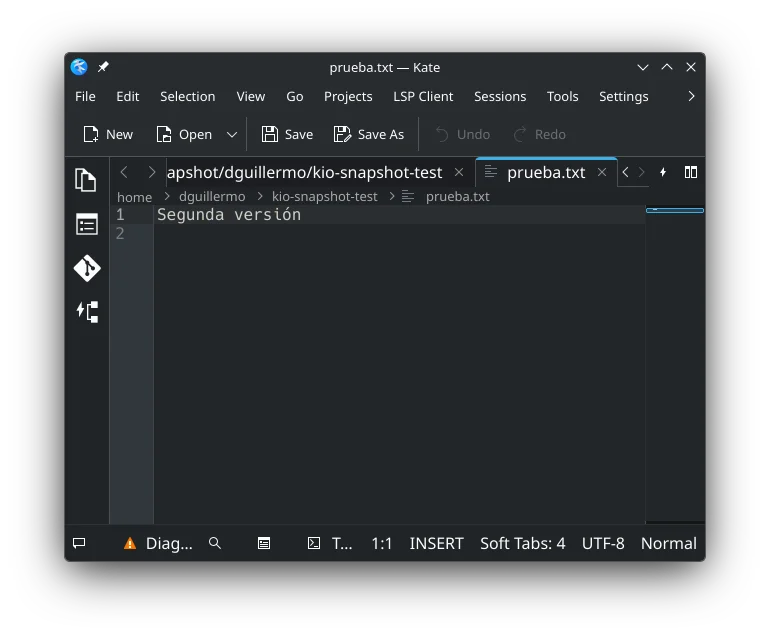
echo "Segunda versión" > ~/kio-snapshot-test/prueba.txt
Check the live file:
cat ~/kio-snapshot-test/prueba.txt
# Segunda versión
In theory, Dolphin: right-click → View snapshots…. In practice, with @ + @home on the same Btrfs UUID, Solid makes the menu disappear and snapshot:/file/… list only Current (see troubleshooting). Meanwhile the real versions are in Snapper:
ls /home/.snapshots/*/snapshot/"$USER"/kio-snapshot-test/prueba.txt
cat /home/.snapshots/3/snapshot/"$USER"/kio-snapshot-test/prueba.txt
# Primera versión
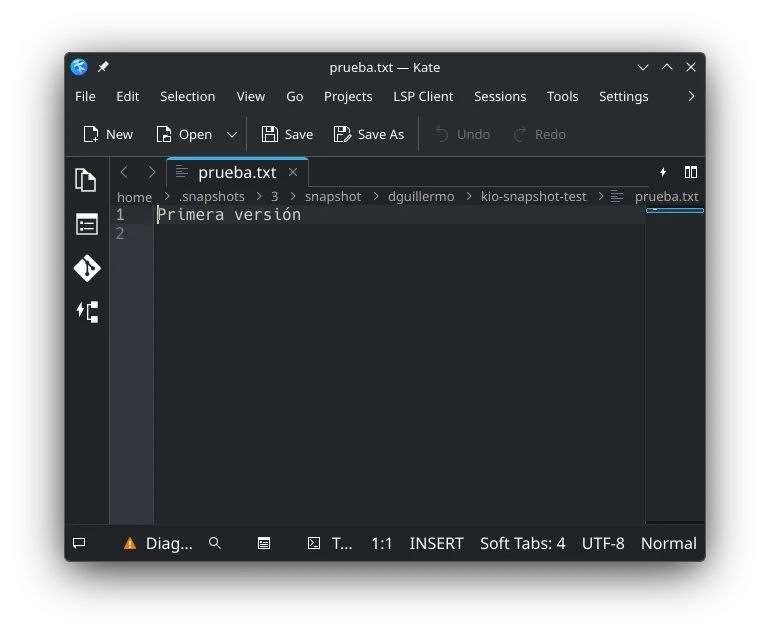
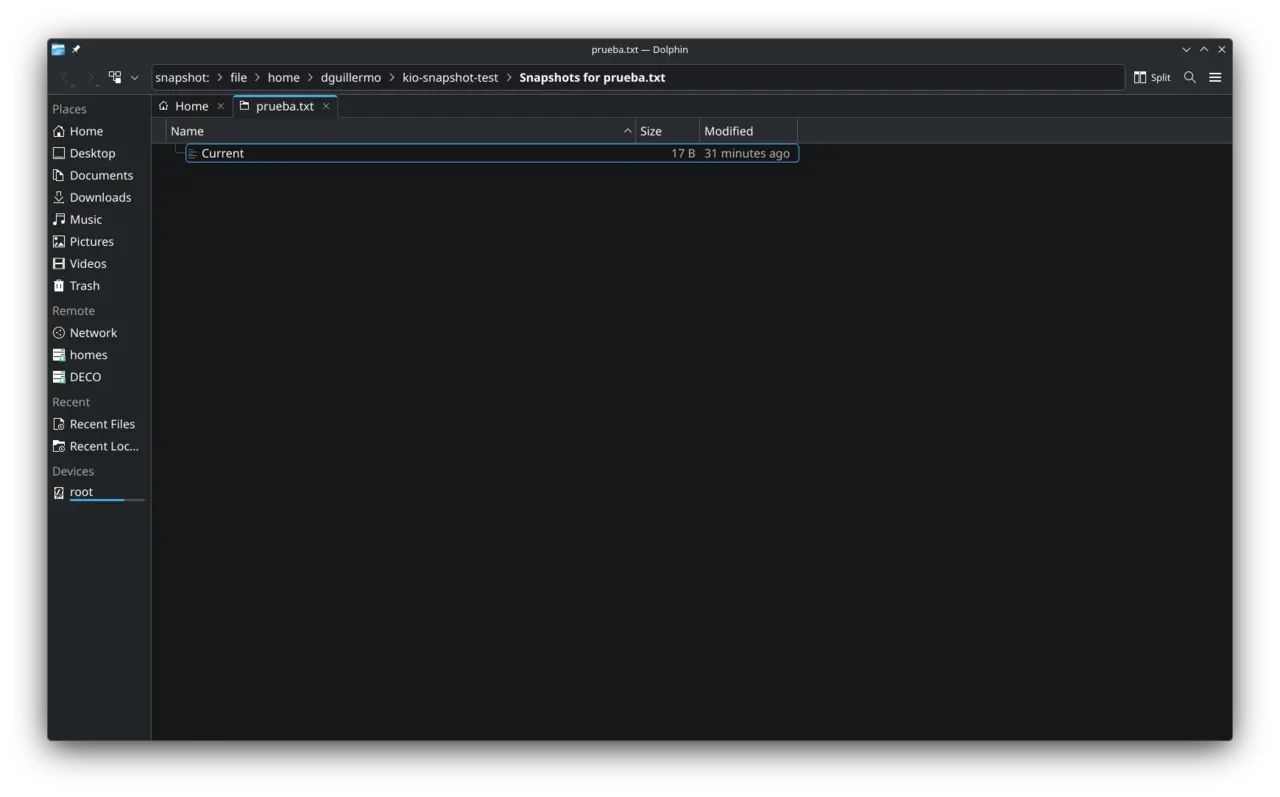
That makes live vs snapshot obvious. It is not a Windows-style “Restore” dialog: when the menu/KIO work correctly it will be a virtual directory; on this layout today, the reliable path is .snapshots.
Optional: delete and restore without the UI (same filesystem):
rm ~/kio-snapshot-test/prueba.txt

# Find the copy inside a readable snapshot
grep -l "Primera versión" \
  /home/.snapshots/*/snapshot/"$USER"/kio-snapshot-test/prueba.txt

# Copy it back (adjust the path grep returned)
cp -a /home/.snapshots/<N>/snapshot/"$USER"/kio-snapshot-test/prueba.txt \
  ~/kio-snapshot-test/prueba.txt

cat ~/kio-snapshot-test/prueba.txt   # → Primera versión
How to verify
These are the checks I ran after configuring it:
pacman -Qi kio-snapshot
test -f /usr/lib/qt6/plugins/kf6/kio/kio_snapshot.so
test -f /usr/lib/qt6/plugins/kf6/kfileitemaction/snapshotfileitemaction.so
snapper list-configs
snapper -c root get-config | grep -E 'ALLOW_USERS|SYNC_ACL'
snapper -c home get-config | grep -E 'ALLOW_USERS|SYNC_ACL'
ls /home/.snapshots | head
snapper -c home list
getfacl /home/.snapshots
Expected: package 1.0.0, both plugins present, root + home configs, ALLOW_USERS set to your user, SYNC_ACL=yes, /home/.snapshots listable without sudo, and user:<your-user>:r-x in getfacl.
Snapshot ≠ backup. KIO Snapshot recovers earlier states stored on the same filesystem. Lose the disk and you lose the snapshots with it. Cheap local undo on CoW — not a disaster-recovery plan.
Troubleshooting
Dolphin does not show “View snapshots…” / “Browse snapshots…”
The plugin is installed; the menu only appears if hasSnapshots() finds captures. On a typical @ + @home layout (same Btrfs UUID) there is a concrete failure:
Solid (storageAccessFromPath) returns filePath=/ even for paths under /home, because / and /home are the same block device. The plugin (and the listDirForFile worker) iterate subvolumes from that filePath. With fsRoot=/ they miss Snapper snapshots under /home/.snapshots; with fsRoot=/home they find them.
Verified on this machine:
Solid → filePath=/     → hasSnapshots(/home/…) = FALSE  → no menu
iterate from /home     → hasSnapshots           = TRUE
snapshot:/file/…       → only “Current” (same bug)
Reliable workaround until fixed (KIO Snapshot should resolve the most specific mount via mountinfo, not Solid’s filePath):
# Open the historical copy directly
dolphin /home/.snapshots/<N>/snapshot/"$USER"/kio-snapshot-test/
# or read it
cat /home/.snapshots/<N>/snapshot/"$USER"/relative/path/to/file
dolphin "snapshot:/file$HOME/…" opens the KIO UI, but on this layout it usually lists only Current.
Basic checks (in case the package did not load):
test -f /usr/lib/qt6/plugins/kf6/kio/kio_snapshot.so && echo OK_worker
test -f /usr/lib/qt6/plugins/kf6/kfileitemaction/snapshotfileitemaction.so && echo OK_menu
kbuildsycoca6 --noincremental
# close every Dolphin window and reopen
When Solid picks the right mount, the menu text is View snapshots… (file) or Browse snapshots… (folder), not “Previous Versions”.
Permission denied on .snapshots
snapper -c home get-config | grep -E 'ALLOW_USERS|SYNC_ACL'
getfacl /home/.snapshots
If your user is missing from ALLOW_USERS or SYNC_ACL is not yes, fix that and create a fresh snapshot. Do not start with manual setfacl unless you know exactly what you are doing.
I see / snapshots but no versions of my documents
findmnt -no SOURCE,FSROOT /
findmnt -no SOURCE,FSROOT /home
snapper list-configs
If you get @ and @home separately and only a root config exists, that is the bug: system snapshots do not contain your home.
If you already have a home config, ACLs are OK, and the menu/KIO do not list historical versions (only Current or nothing), that is the Solid/filePath=/ case above. The copies are still under /home/.snapshots/.
Limits worth saying out loud
- Btrfs only (and layouts where the user can enumerate subvolumes/snapshots). Not a generic Time Machine for ext4.
- It does not take captures: without Snapper (or another orchestrator), the menu will be empty.
@≠@home: forgetting thehomeconfig is the most likely failure on rolling distros with separate subvolumes.- Space: snapshots are cheap until you stop cleaning;
snapper-cleanup.timerandNUMBER_*/TIMELINE_LIMIT_*are not decoration. - KDE Linux plans to ship Snapper + KIO Snapshot by default; on CachyOS/Arch you wire it in five minutes — and the home detail is your job.
Closing
Previous Versions on the Linux desktop was not a kernel problem: Btrfs already did the CoW. What was missing was the last metre into Dolphin. KIO Snapshot is that metre.
In practice: pacman -S kio-snapshot, Snapper permissions, a home config if /home lives on its own subvolume, and previous versions stop being something you have to dig up from a terminal.
References
- Btrfs Snapshot Integration in KDE — announcement and design, by Bharadwaj Raju
- kio-snapshot on invent.kde.org — source
- CachyOS PR #408: Add kio-snapshot — request for the CachyOS derived repo
- KDE Linux Alpha — on this blog: Snapper + KIO Snapshot by default on KDE’s reference distro